Best Receipt Scanning Apps: Master Your Expenses
Do you struggle with piles of paper receipts? For anyone from freelancers to growing businesses, manual expense management wastes time and invites errors. The best receipt scanning apps offer an essential solution, helping you master your expenses and simplify your financial tracking. Leading tools like Expensify, Zoho Expense, and Portmoneo automate data entry, transforming paper slips into organized digital records.
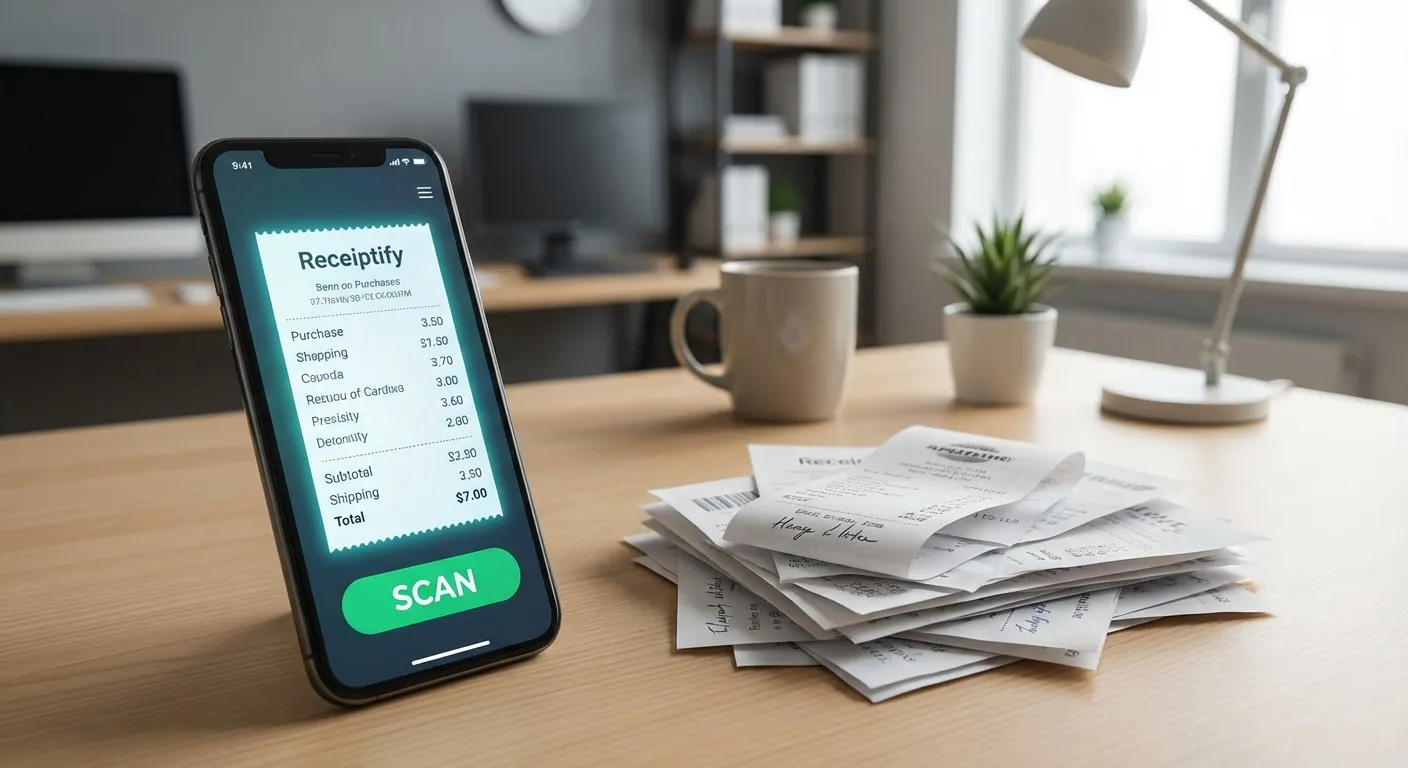
Many face the challenge of faded, crumpled receipts that complicate budgeting and tax season. Manually logging transactions is not only tedious but also prone to human error. Such errors can lead to missed deductions or an inaccurate view of your financial health.
This widespread problem highlights why a quality receipt scanning app is now vital. It turns your smartphone into a powerful financial assistant. The app uses smart technology to instantly capture, read, organize, and categorize all your spending data. This digitization frees you from administrative tasks, empowering smarter financial decisions.
How Do AI Expense Trackers Optimize Financial Workflows?
Direct Answer: No more data entry. AI reads receipts, sorts them, and flags tax info. It turns a manual chore into a 5-second scan, giving you real-time visibility into your cash flow.
A top-tier AI expense tracker offers more than simple image capture. It’s an intelligent system providing a clear, real-time picture of your financial health. By eliminating manual data entry, these apps allow you to focus energy on strategic business growth or personal pursuits.
The core of this transformation involves several key areas:
What are the main benefits of automating data entry with a scanning app?
Direct Answer: Instant Extraction. It pulls Merchant, Date, Amount, and Tax in milliseconds. No typos, no guessing. It’s faster and more accurate than your fingers.
Imagine snapping a photo of a receipt. Within seconds, the app automatically extracts crucial details. This includes the merchant’s name, the total amount, the date, and even individual line items. This instant data capture eliminates manual entry, drastically reducing errors and saving countless hours. No more squinting at faded ink or deciphering handwriting.
How do these apps intelligently organize spending?
Direct Answer: Smart Buckets. It learns. “Uber” goes to Travel; “Staples” to Office. This consistency reveals spending habits and makes tax compliance automatic.
Beyond mere capture, these apps use advanced algorithms to automatically categorize your expenses. Whether it’s “Travel,” “Office Supplies,” “Meals & Entertainment,” or “Client Project X,” your spending sorts into logical categories. This organized overview helps identify spending patterns, stick to budgets, and quickly pinpoint areas for potential savings.
How do receipt scanning apps simplify tax preparation?
Direct Answer: Audit-ready. Digital records, searchable exports, and categorized reports. Hand your accountant a clean CSV instead of a shoebox of panic.
Come tax season, the benefits are clear. Instead of sifting through shoeboxes of paper, you access clean, categorized, and audit-ready reports. These reports generate in various formats, making them easy to share with your accountant or import into tax software. This streamlines the entire process, minimizing stress and maximizing potential deductions.
At the heart of any truly effective receipt scanning app is Optical Character Recognition (OCR) technology. This sophisticated AI-driven feature “reads” text on physical receipts, translating it into digital data. High OCR accuracy is essential; consistent misinterpretation wastes more time correcting than manual entry. To grasp the fundamentals, explore the basics of effective receipt scanning and how it automates this tedious task.
Another crucial aspect is seamless integration with existing financial tools. Your expense data should flow effortlessly into accounting software, project management platforms, or payroll systems. This robust integration drives the global receipt scanner app market’s projected growth to $1,200 million by 2033. The demand for smart, connected tools that reduce administrative overhead is intensifying Data Insights Market Report.
Which Features Define the Best Receipt Scanning Apps?
Direct Answer: Precision. Top apps use advanced OCR (Line-Item extraction), handle offline modes, and integrate with accounting tools. They are reliable financial assistants, not just cameras.
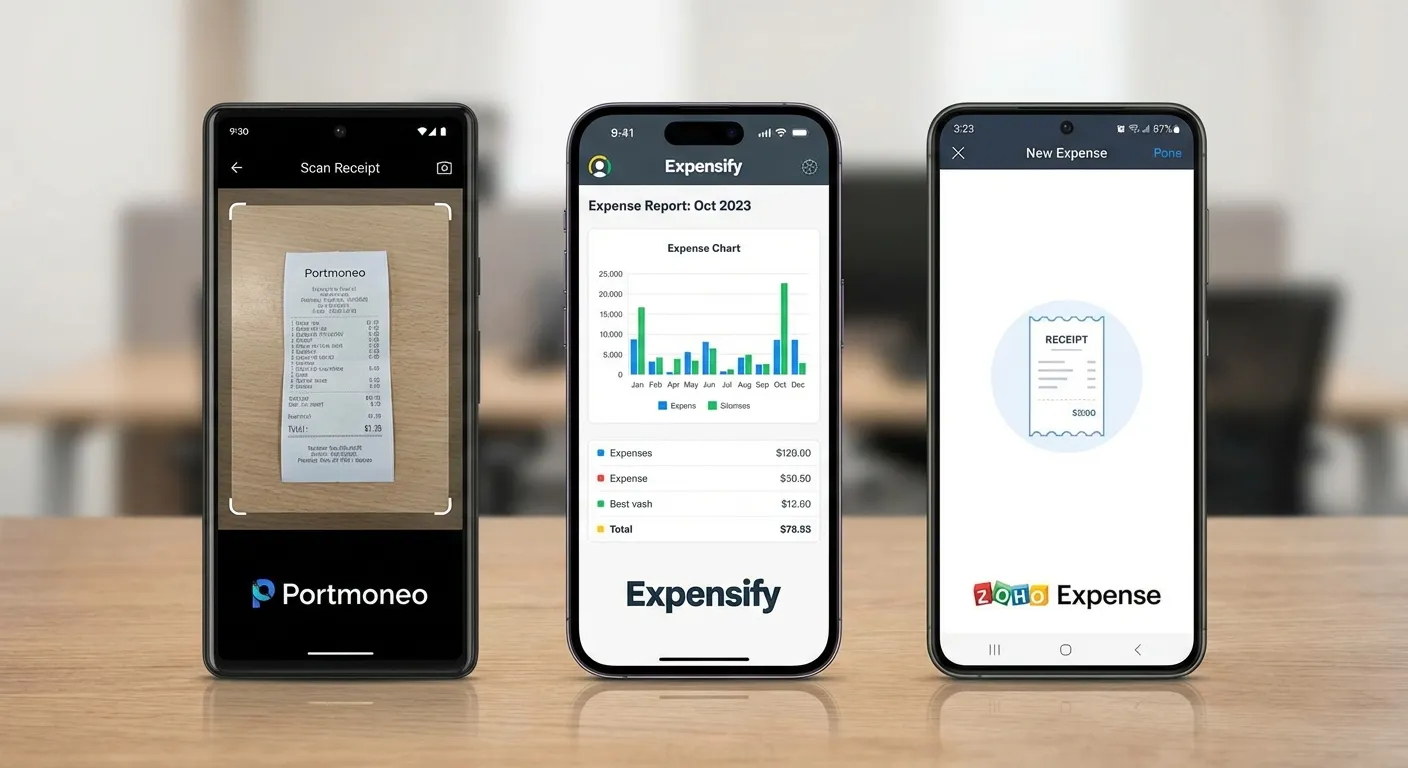
Now that we understand the foundational technologies and benefits, let’s explore how leading market players differentiate. The best receipt scanning apps offer more than just a camera function; their true value lies in how they interpret images, integrate with your financial ecosystem, and support specific workflow needs. Each app brings distinct strengths, so the optimal choice depends on individual or business requirements.
For instance, consider Portmoneo. Our testing shows it’s engineered for users requiring granular detail and precise financial tracking. Its advanced AI excels at line-item extraction, meticulously pulling out every single item from a lengthy grocery receipt or a multi-page invoice. If your work demands project-specific cost tracking, detailed budget analysis, or highly granular data for tax write-offs, Portmoneo’s depth of detail is a significant advantage. It transforms a basic receipt into an insightful, itemized expense report, perfect for consultants and small businesses with complex costing needs.
How do top receipt scanning apps differentiate for specific workflow needs?
Direct Answer: Focus areas. Portmoneo = Detail & Privacy. Expensify = Team Control. Zoho = Ecosystem. Choose based on whether you need granular data or corporate hierarchy.
In contrast, Expensify has built its reputation on powerful, enterprise-grade expense management, particularly suited for teams. While its SmartScan technology offers impressive OCR, Expensify’s true power lies in automated approval workflows, corporate card reconciliation, and policy enforcement. This makes it ideal for small to medium businesses needing to manage employee reimbursements, ensure compliance, and streamline approvals. Its ability to handle complex organizational structures sets it apart.
Then there’s Zoho Expense, which stands out for organizations already using other Zoho products. Its deep and seamless integration with the broader Zoho ecosystem—including Zoho Books, CRM, and Projects—is a defining strength. For existing Zoho users, it functions as a native, interconnected extension of their business management suite, providing a unified platform.
The most significant performance differentiator among these platforms often boils down to pure OCR accuracy. Our internal data and industry benchmarks reveal that leading apps consistently achieve accuracy rates of 95% or higher. This can dramatically slash manual data entry time by up to 75%. This level of precision not only saves time but also minimizes errors, leading to more reliable financial reporting. For a deeper dive into these impacts, you can explore various industry benchmarks and their implications.
What is a feature snapshot of the leading receipt scanning apps?
Direct Answer: Feature Match. Portmoneo: Line-items, Freelancers. Expensify: Corporate Cards, Approvals. Zoho: Suite Users. Match the tool to your organizational structure.
To provide a clear, side-by-side comparison, here’s a quick breakdown of how these leading apps stack up:
| App | Key Feature Highlight | OCR Accuracy | Offline Support | Primary Integration | Best For |
|---|---|---|---|---|---|
| Portmoneo | Advanced line-item extraction, detailed categorization, granular reporting | Excellent | Yes | QuickBooks, Xero, Google Sheets | Freelancers, Consultants, Project-based work |
| Expensify | Automated approval workflows, corporate card reconciliation, policy enforcement | Very Good | Yes | NetSuite, Sage Intacct, SAP | Small to Medium Businesses, Teams with policies |
| Zoho Expense | Deep integration with the entire Zoho software suite, robust reporting | Very Good | Yes | Zoho Books, Zoho CRM, Zoho Projects | Existing Zoho Users, Growing Businesses leveraging Zoho Ecosystem |
This table shows that while all are robust, their primary focus—be it granular data analysis, comprehensive team management, or seamless ecosystem synergy—will determine the best fit for your specific financial needs.
How Can You Find the Right Receipt Scanning App for Your Needs?
Direct Answer: Identify your bottleneck. Taxes? Get high-detail OCR (Portmoneo). Team spending? Get approval flows (Expensify). Travel? Get offline mode. Solve the specific pain point.
A universally “best” receipt scanning app simply doesn’t exist. The ideal tool for a freelancer meticulously tracking tax deductions differs from what a small business owner needs for diverse team expenses. Your daily financial challenges and long-term goals should be the decisive factors. Ensure you invest in features you’ll genuinely utilize without overpaying for unnecessary complexities.
Which receipt scanning app is best for freelancers or solopreneurs?
Direct Answer: Portmoneo. It offers the detail needed for Schedule C, separates business/personal, and works for free. It’s built for the independent workflow.
To help you navigate, consider which scenario most closely mirrors your situation:
- For the Dedicated Freelancer or Solopreneur: Every legitimate deduction is crucial come tax time. You need an app that masters detail and accuracy. Look for flawless OCR that extracts individual line items, highly customizable expense categories, and the ability to generate clean, accountant-ready reports. Your primary objective is precise expense capture, simplified tax preparation, and clear distinction between business and personal spending. Consider mileage tracking if your work involves travel.
Which app is best for agile small business owners?
Direct Answer: Expensify or Zoho. You need role-based access, corporate card syncing, and approval chains. These prevent spending leaks in growing teams.
- For the Agile Small Business Owner: Your focus is on efficient team spending without paperwork and manual approvals. Seek an AI expense tracker with automated approval workflows, multi-user access with customizable roles, and seamless reconciliation of corporate card spending. Robust integration with your existing accounting software (like QuickBooks Online or Xero) is essential, ensuring data flows effortlessly into your books.
What features are essential for frequent travelers in a receipt app?
Direct Answer: Offline Reliability. Portmoneo excels here. Scan on a flight, sync in the hotel. Multi-currency support is also non-negotiable for global work.
- For the Frequent Traveler: Your biggest challenge is often a spotty internet connection or managing expenses across different currencies. Critical features include rock-solid offline support—the ability to scan and categorize receipts even when flying or in remote areas, with automatic syncing once online. Pair this with excellent multi-currency support, intuitive per diem tracking, and quick reimbursement capabilities. This creates a tool that makes managing expenses from anywhere truly easy.
What Are the Best Practices for Using a New Receipt App Effectively?
Direct Answer: Workflow wins. 1. Link Accounts (for automation). 2. Define Categories (for clarity). 3. Scan Immediately (for sanity). Consistency beats intensity.
Choosing the right receipt scanning app is a great first step. However, true efficiency and financial clarity come from seamlessly integrating it into your daily routine. To maximize its value, don’t overlook a few crucial setup steps and habit formations.
First, prioritize connecting your bank accounts and credit cards. This often provides the most powerful automation. Once linked, the app automatically imports and matches transactions. This significantly reduces manual data entry and helps flag discrepancies or potential fraudulent activities. Simultaneously, dedicate a few minutes to customize your expense categories. Tailoring these to your specific business or personal needs ensures every dollar sorts accurately. This applies whether it’s for a client project, a personal budget line, or a tax-deductible category.
The single most important habit is to scan receipts the moment you receive them. That quick snap after buying coffee or paying for parking takes mere seconds. It saves you from tackling a mountain of crumpled paper later. This simple, consistent act transforms your AI expense tracker from just another app into a powerful, real-time financial partner. It keeps your records impeccable and always up-to-date.
If you want to take your organized data further for deeper analysis or custom reporting, explore our comprehensive guide on how to convert a receipt to an Excel file for expert pointers and step-by-step instructions.
This flowchart visually represents how different app features align with distinct user needs:
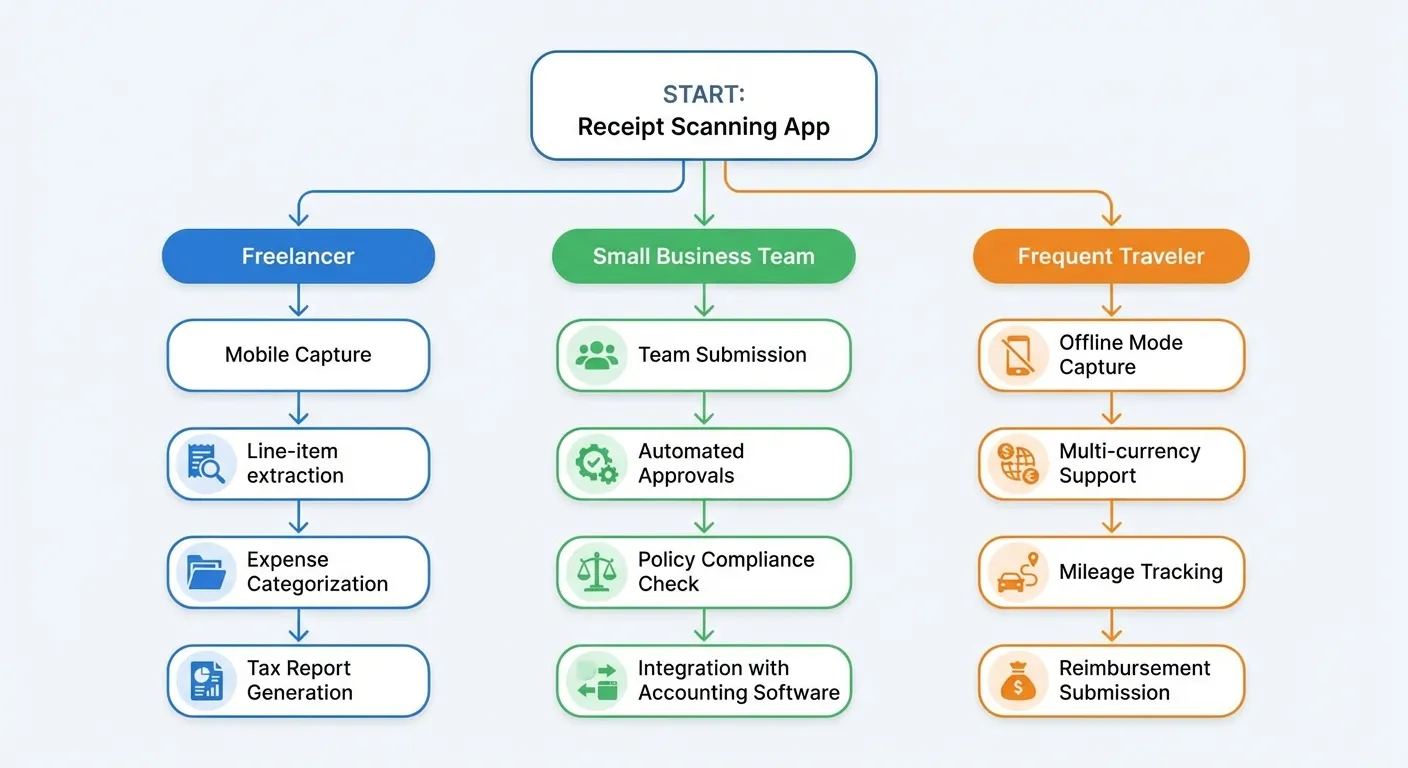
Ultimately, let your primary financial goal—be it simplifying taxes, streamlining team spending, or meticulously tracking travel expenses—guide both your app selection and its integration into your daily workflow.
What is the Future of Automated Expense Management?
Direct Answer: Proactive Advice. Apps won’t just track; they’ll coach. “You’re over budget on dining,” “This looks like a tax deduction.” From recorder to advisor.
Embracing a great receipt scanning app today is more than an organizational win; it’s a gateway to smarter financial management. The technology powering these tools evolves rapidly. It’s quickly moving beyond data entry to offer sophisticated, proactive financial intelligence. We are truly on the cusp of an era where these apps function less like digital file cabinets and more like intuitive, personal financial advisors.
The next generation of these tools will leverage advanced machine learning and predictive analytics. They will offer invaluable insights into your spending habits. Imagine an AI expense tracker that doesn’t just tell you what you spent last month. It proactively suggests where you can save next month based on historical data and current financial goals. These systems will build dynamic, personalized budgets, adapting in real-time as your spending patterns change.
Picture an app that automatically flags potential tax deductions you might have overlooked. Or one that intelligently identifies unusual spending patterns that could indicate fraud. It might also suggest small budget adjustments in real-time as you make purchases. This paradigm shift transforms expense management from a tedious, backward-looking chore into a forward-looking, strategic tool. It actively helps you optimize your financial health.
Consider the tangible case of Alex, a freelance graphic designer. Before adopting an automated receipt scanning system, Alex spent nearly two full days every quarter meticulously sorting receipts for tax filings. After implementing a top-tier app, the entire process now takes approximately one hour. This significant time saving allowed Alex to comfortably take on an additional project each quarter, boosting annual income by over 10%. This demonstrates the real-world impact of automating administrative tasks. It frees you to focus on what genuinely drives growth and adds value to your business.
Frequently Asked Questions About Receipt Scanning Apps
We understand that diving into new technology, especially with sensitive financial data, naturally brings important questions. Let’s address some common concerns and provide clarity.
Is My Financial Data Actually Secure When Using These Apps?
Yes, reputable receipt scanning apps prioritize robust security. They employ state-of-the-art protocols like end-to-end AES-256 encryption for data transmission and storage, secure multi-factor authentication (MFA), and operate in compliant data centers. This ensures your financial information is scrambled and protected from unauthorized access, offering peace of mind.
This is arguably the most critical concern, and for excellent reason. The short answer is yes, with any reputable and widely-used receipt scanning app, your financial data is extremely secure. These companies invest heavily in state-of-the-art security protocols. They often employ the same robust measures your bank uses.
They rely on heavy-duty, end-to-end encryption (typically AES-256 standards) for data transmission and storage. They use secure multi-factor authentication (MFA) for logins. They also operate within highly secure, compliant data centers. This means your financial information is scrambled and protected from the moment you scan it until it reaches their fortified servers, keeping it private and inaccessible to unauthorized parties. Always look for apps that mention compliance certifications like SOC 2 or GDPR for added peace of mind.
What About All My Email Receipts? Do I Need to Print Them?
No, you do not need to print email receipts. Most top-tier receipt scanning apps feature intelligent integrations for digital receipts. You can either forward e-receipts to a unique app-provided email address, or securely connect your email inbox directly. The app then automatically processes and categorizes these digital confirmations, centralizing all your expenses.
Good news: you absolutely do not need to print out digital receipts just to scan them. Most top-tier receipt scanning apps feature intelligent integrations designed specifically for email receipts.
These functionalities typically allow you to:
- Forward E-receipts: Simply forward your digital receipts from online purchases (like Amazon, Uber, or airline tickets) to a unique email address provided by the app. The app then automatically processes and categorizes them.
- Direct Email Integration: Many apps also allow you to securely connect your primary email inbox (such as Gmail, Outlook, or Yahoo Mail) directly. The app then intelligently scans for purchase confirmations and e-receipts, automatically importing them. This creates a powerful, centralized hub for all your expenses, whether they started as paper or digital confirmations.
Is a Receipt Scanning App Just a Fancy Scanner or Something More?
A receipt scanning app is significantly more than a fancy scanner. While a basic scanner merely captures an image, an AI expense tracker uses advanced OCR, machine learning, and natural language processing to read and understand the receipt. It intelligently extracts structured data like vendor, date, and amount, then automatically categorizes it for reporting and integration with other financial software.
There’s a fundamental and significant difference between a basic image scanner and a sophisticated AI expense tracker. A simple scanner, whether a physical device or a basic mobile app, primarily acts as a digital photocopier—it captures an image of your receipt and saves it as a picture or PDF. While useful for digitizing documents, it doesn’t process the information contained within.
An AI expense tracker, on the other hand, is a different class of tool. It uses advanced technologies like OCR, machine learning, and natural language processing to actually read and understand the receipt. It doesn’t just store an image; it intelligently extracts and structures the data: the vendor name, date, total amount, taxes, payment method, and often even individual line items. More importantly, it then automatically categorizes this expense, assigns it to a budget, and makes it available for reporting and integration with other financial software. It’s the crucial difference between having a simple picture of your data and having actionable, intelligent data ready to plug directly into your financial analysis.
Can Receipt Scanning Apps Handle Multiple Currencies and Exchange Rates?
Yes, most advanced receipt scanning apps are designed to handle multiple currencies and automatically convert them. When you scan a receipt in a foreign currency, the app typically identifies the currency, applies current exchange rates, and converts the amount into your base currency. This feature is crucial for international travelers and businesses managing global expenses.
How Accurate is the OCR Technology in These Apps?
The accuracy of OCR technology in leading receipt scanning apps is remarkably high, often exceeding 95%. This precision allows apps to correctly extract merchant names, dates, amounts, and even line items from various receipt formats. While occasional minor corrections may be needed, this high accuracy drastically reduces manual entry time and improves overall data reliability.