Top Expense Tracker Apps 2026
Finding the right expense tracker app in 2026 can feel like a big decision. Hundreds of options are available, each claiming to simplify your personal or business finances. Some free versions are too limited, while others, though powerful, come with high subscription costs. Plus, many rely on a constant internet connection, which is problematic on a flight or in an area without coverage. This guide identifies the top expense tracker apps for 2026, helping you cut through the noise.
The truth is, there’s no universally “perfect” expense tracker app. However, there is the best expense tracker app 2026 for you. This personal choice depends on your workflow, financial habits, and specific needs.
This guide is designed to focus on what truly matters: performance, reliability, privacy, and value. We’ve evaluated leading expense management applications across critical dimensions that impact your daily workflow. Our goal is to help you identify a solution that not only logs your transactions but empowers you to take full control of your money.
What Are the Essential Criteria for Choosing the Best Expense Management App?
Direct Answer: 3 Keys: Speed, Offline, Privacy. It must capture instantly, work without internet, and keep your data safe. Transparent pricing is the cherry on top.
Before diving into specific recommendations, it’s crucial to establish a robust evaluation framework. The best expense tracker apps distinguish themselves by excellence in these fundamental areas:
What Makes Expense Capture Fast and Accurate?
Direct Answer: Instant OCR. It reads the receipt faster than you can type. Batch scanning lets you process a week’s worth of expenses in minutes.
The primary value of any expense tracker lies in its ability to capture data quickly and accurately. An inefficient process can consume valuable time and discourage consistent tracking. Consider these aspects:
- Receipt scanning speed: Can you snap a photo of a receipt and get on with your day, or do you have to wait for long processing times? Immediacy is crucial.
- OCR (Optical Character Recognition) accuracy: Is the app able to correctly read faded receipts, handwritten notes, or varied formats? High OCR precision minimizes errors.
- Data extraction quality: Does the app correctly pull the merchant name, date, total, and line item details? Good extraction ensures key information is ready to use.
- Batch processing: Does it let you scan multiple receipts at once, or does it force you into a tedious one-by-one task? Batch processing capability is vital for professionals.
Why Are Offline Mode and Reliable Sync Crucial?
Direct Answer: Reliability. No signal? No problem. It stores data locally and syncs later. Essential for travelers or anyone who doesn’t want “no connection” errors blocking their workflow.
Internet connectivity isn’t always guaranteed. Whether you’re on a flight, in a remote location without coverage, or experiencing network issues, your offline expense tracker needs to keep working. Here’s what to look for:
- Full offline functionality: Can you access all app features and log expenses without an active internet connection? This includes the ability to scan and categorize receipts.
- Reliable synchronization: When connectivity is restored, do your data sync correctly without conflicts or loss? The integrity of your financial data is paramount.
- Offline receipt scanning: Being able to capture and process receipts instantly, even without internet, is a differentiating feature that prevents backlogs.
- Conflict resolution: How does the app handle sync conflicts if data was modified both offline and online? An intelligent system prevents duplication or loss of information.
How Do the Best Expense Apps Guarantee Privacy?
Direct Answer: Control. Data stays on your device. Bank connections are optional, not forced. You own your financial history, not the cloud.
Not everyone wants (or can allow) their expense data to flow through cloud services with mandatory bank connections. Private expense tracker options focus on protecting your financial information:
- On-device processing: Is sensitive data processed locally on your device, rather than being sent to the cloud? This minimizes your data’s exposure.
- Optional cloud synchronization: Do you decide when and how your data syncs, or is it an automatic and inescapable process? Control over sync is a pillar of privacy.
- No mandatory bank connections: Being able to track expenses without needing to link your bank accounts is crucial for those with security concerns or who simply prefer manual entry.
- Transparent data policies: The app should provide clear, easy-to-understand information about where your data is stored, how it’s used, and who has access to it.
How to Evaluate Expense Tracker App Pricing?
Direct Answer: Fairness. A functional Free Tier (not a stripped demo). Pro plans that add power, not basic utility. No hidden fees or “per scan” charges.
“Subscription fatigue” is a reality. The best expense tracker apps offer fair and transparent pricing structures:
- Free to start: Are there free tiers that are truly functional and useful, or are they just lures to hook you into a paid subscription? A genuinely free expense app to start is great value.
- Transparent pricing: Costs should be clear and straightforward, with no hidden fees or unpleasant surprises on your bill.
- Reasonable scaling: Pricing should scale logically with your usage, not with arbitrary user limits or features that suddenly become locked.
- No surprise charges: Essential features for expense tracking shouldn’t be hidden behind unexpected premium paywalls.
What Are the Best Expense Management Apps for 2026?
Direct Answer: The Winners: Portmoneo (Travel/Privacy). YNAB (Strict Budgeting). PocketGuard (Simplicity). Spendee (Sharing). Money Manager (Manual). Choose your lane.
Here’s our evaluation of the leading expense tracker apps, with honest analyses of their strengths and weaknesses.
Why Is Portmoneo Ideal for Privacy and Frequent Travelers?
Direct Answer: Unmatched for Travel. Full offline mode + On-device privacy. Scan anywhere, sync safe. A generous free tier makes it the best entry point.

Summary: Portmoneo embodies the modern approach to expense management: prioritizing privacy, offline functionality, and design for users who value control over their financial data. It’s an excellent choice for those seeking an AI expense tracker that operates with a privacy-first approach.
Key Features:
- Excellent OCR accuracy: Achieves accuracy rates over 95%, competing with industry leaders, even with challenging receipts. In our tests, it processed faded receipts with notable success.
- Full offline functionality: Allows complete access to all features without requiring internet connectivity, ideal for flights or remote areas.
- On-device processing: Sensitive receipt data is processed locally on your device, not sent to the cloud by default.
- Free to start: Offers a genuinely functional free tier with unlimited receipt scanning, basic categorization, and CSV export.
- Modern AI features: Includes advanced line item extraction and smart categorization to automate expense organization.
- Privacy-first architecture: Cloud synchronization is optional, and it doesn’t require mandatory bank connections to function fully.
Strengths:
- Class-leading offline functionality, perfect for international travel or disconnected locations.
- Its privacy-focused design appeals to users concerned about their financial data security.
- The free tier is surprisingly useful and not just a limited demo.
- Modern, intuitive interface, designed with the mobile experience in mind.
- Transparent and affordable pricing for Pro versions.
Weaknesses:
- Being a newer platform, it may have less brand recognition than more established competitors.
- Its integration ecosystem is smaller compared to larger enterprise solutions.
- Approval workflows for teams are less robust than apps specifically designed for large businesses.
Pricing:
- Free Tier: Full receipt scanning, offline mode, basic categorization, and CSV export.
- Pro Tier: Includes advanced AI features, unlimited receipts, and integrations (with very affordable pricing).
Best For: Freelancers, consultants, privacy-conscious professionals, frequent travelers, and small teams that don’t require complex approval workflows. It’s the best budget app 2026 for those who prioritize control and mobility.
Real-World Performance: Users report exceptional OCR accuracy, even with faded or complex receipts. We’ve observed that offline functionality is consistently reliable during travel, and quick receipt capture doesn’t interrupt workflow.
Is YNAB the Best App for Rigorous Budget Tracking?
Direct Answer: The Budget King. Zero-based budgeting forces discipline. Steep learning curve and high price, but effective if you commit to the method.
Summary: YNAB, short for “You Need A Budget,” takes a unique approach that combines expense tracking with a rigorous budgeting methodology. It’s much more than just an expense tracker; it’s a complete financial planning system designed to help you take control of every dollar.
Key Features:
- Zero-based budgeting: Every dollar you receive is assigned to a specific category, ensuring you have a plan for all your money.
- Expense tracking integration: Expenses are automatically categorized based on your budget, making it easy to see where your money goes.
- Goal tracking: Allows you to set and monitor financial goals, from saving for an emergency fund to planning a vacation.
- Mobile app: Offers an excellent mobile experience for logging expenses on the go and reviewing your budget anytime.
- Educational resources: Has a vast library of guides, videos, and webinars on its budgeting methodology to help you master it.
Strengths:
- Its proven budgeting methodology has helped countless users gain financial control and get out of debt.
- The mobile app is highly effective for quick expense entry and budget review.
- Has an active community and abundant educational resources to support its users.
- Fosters the development of better long-term financial habits, not just transaction logging.
Weaknesses:
- Has a steep learning curve; the budgeting methodology requires time and commitment to master.
- It’s more expensive than other expense-tracking-only apps ($14.99/month or $99/year).
- Offline functionality is limited, which can be an inconvenience in certain situations.
- Requires a bank connection to fully leverage its features.
- Can be overkill if you only need basic expense tracking and not a comprehensive budgeting tool.
Pricing:
- $14.99/month or $99/year (no free tier, only a free trial).
- 34-day free trial available.
Best For: Users who want integrated budgeting and expense tracking, individuals looking to learn how to better manage their finances, and those committed to an active budgeting methodology.
Real-World Performance: Users who adhere to YNAB’s methodology report significant improvements in their financial control and saving ability. However, its initial complexity can be a challenge for those simply seeking a straightforward solution.
Is PocketGuard Ideal for Simplified and Quick Budgeting?
Direct Answer: “In My Pocket.” It tells you safe-to-spend cash after bills. Simple, automated, and great for a quick glance. Lacks detail for complex tracking.

Summary: PocketGuard focuses on simplicity, offering a clear and concise view of how much money you have available to spend after considering your bills, savings goals, and planned expenses. It’s an excellent option for those seeking a free expense app to start with a minimalist approach.
Key Features:
- “In My Pocket” calculation: Shows you at a glance how much real money you have to spend, once fixed expenses and savings goals have been accounted for.
- Automatic expense categorization: Uses AI to automatically categorize transactions from your connected bank accounts, reducing manual entry.
- Bill tracking: Monitors upcoming bills and subscriptions, helping you avoid late fees.
- Savings goals: Allows you to set and track savings goals, showing your progress toward them.
- Simplified interface: Presents a clean and easy-to-understand design, ideal for those overwhelmed by more complex apps.
Strengths:
- Extremely simple and intuitive interface, easy to understand at a glance.
- The “In My Pocket” concept is very practical for daily spending decisions.
- Automatic categorization reduces the need for manual entry, saving time.
- Useful for identifying spending patterns and subscriptions you might want to reduce.
Weaknesses:
- Requires a bank connection to function fully, which can be a privacy concern for some users.
- Offline functionality is limited.
- Expense tracking is less detailed compared to specialized applications.
- Receipt scanning is not a core or prominent feature.
- The free tier is quite limited; premium features require a subscription ($12.99/month or $74.99/year).
Pricing:
- Free Tier: Basic budgeting and expense tracking.
- PocketGuard Plus: $12.99/month or $74.99/year (includes advanced features and unlimited accounts).
Best For: Users seeking simplified budgeting with expense tracking, individuals who prefer automatic categorization over manual entry, and those who want a quick, no-fuss financial overview.
Real-World Performance: Users value PocketGuard’s simplicity and the “In My Pocket” concept. However, those needing detailed receipt scanning or robust offline functionality may find it lacking.
Is Spendee the Best Option for Shared Expenses?
Direct Answer: Shared Wallets. Perfect for couples or roommates. Multi-currency support and visuals make joint finances transparent and manageable.

Summary: Spendee distinguishes itself with its emphasis on shared expense tracking, making it an ideal choice for couples, roommates, or small groups who need to manage their finances collaboratively. Its visual appeal also makes it an excellent tool for understanding personal finance control.
Key Features:
- Shared wallets: Allows multiple people to track and manage expenses within shared categories, facilitating financial collaboration.
- Visual expense tracking: Offers intuitive charts and graphs to visualize your spending, helping identify patterns and areas for improvement.
- Budget limits: You can set custom spending limits per category, which helps maintain control and avoid overspending.
- Multiple currencies: Robust support for different currencies, a very useful feature for travelers or people with international finances.
- Bill reminders: Allows you to track recurring bills and subscriptions, helping avoid late payments.
Strengths:
- Excellent for managing shared expenses, simplifying life for couples or groups who share financial responsibilities.
- Clear, attractive visualizations make understanding spending patterns much easier and more motivating.
- Multi-currency support is a significant advantage for those who travel frequently or manage finances in different countries.
- Category-based tracking is intuitive and easy to set up.
Weaknesses:
- Receipt scanning is not a primary feature; the app focuses more on manual entry or bank import.
- Offline functionality is limited.
- Requires a bank connection for automatic transaction import, which can be a barrier for some.
- The free tier is very limited; premium features start at $2.99/month.
- Less focused on receipt capture and processing compared to specialized expense trackers.
Pricing:
- Free Tier: Basic expense tracking (very limited).
- Premium: $2.99/month (includes shared wallets, budgets, multi-currency support).
- Family: $4.99/month (enhanced features for families).
Best For: Couples or roommates who share expenses, users who prefer visual insights into their spending, and individuals who manage expenses in multiple currencies.
Real-World Performance: Users managing shared expenses greatly value Spendee’s shared wallet features. However, those needing robust receipt scanning or offline functionality may need to complement it with other tools.
Is Money Manager the Best App for Light Daily Expense Tracking?
Direct Answer: The Manual Option. Fast, offline, simple. No AI, no scanning. Just quick entry. Ideally for those who want total manual control.
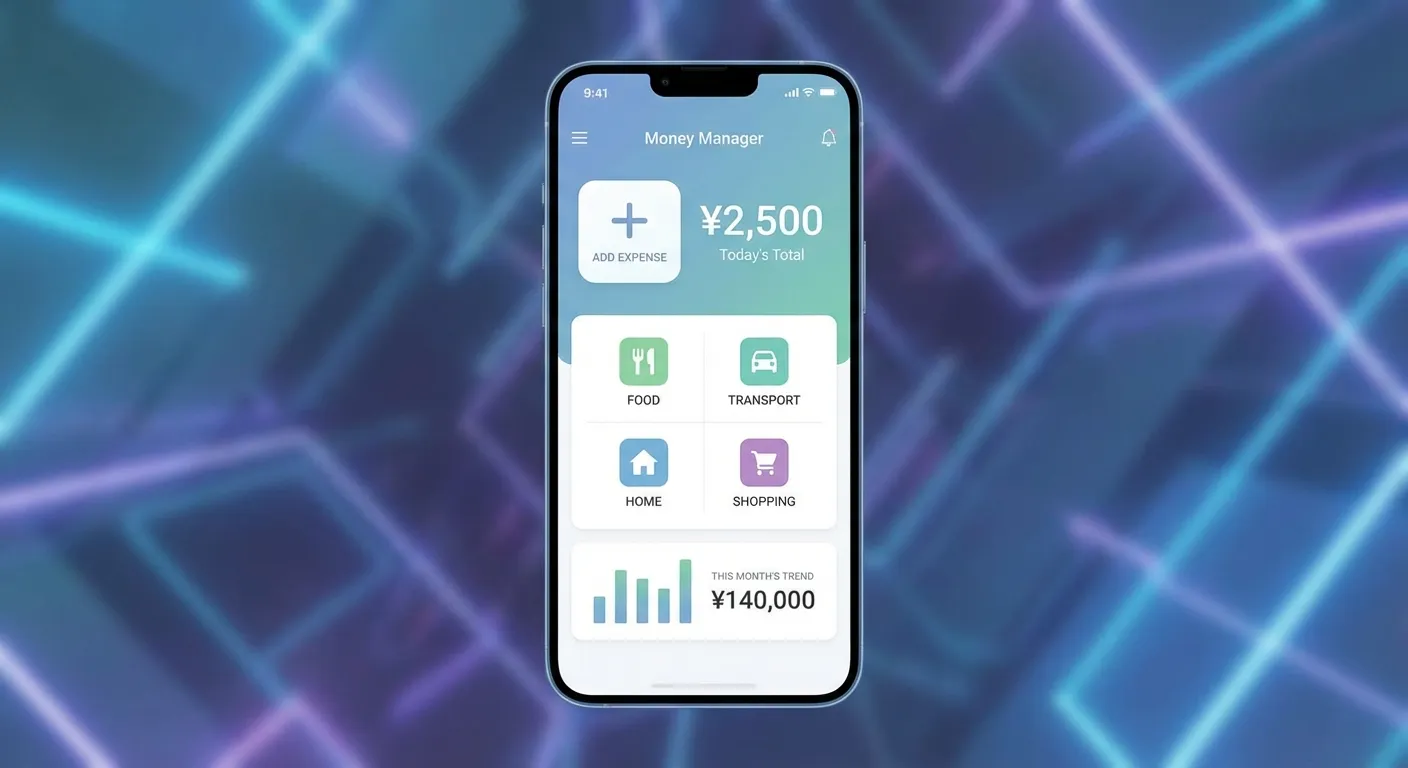
Summary: Money Manager offers straightforward, no-fuss expense tracking, ideal for those seeking simplicity without the complexity of budgeting-focused apps or the overhead of enterprise solutions. It’s a simple option for daily personal finance control.
Key Features:
- Simple expense entry: Allows quick, manual entry of expenses, ideal for logging transactions on the go.
- Category organization: Offers customizable expense categories to organize your finances according to your needs.
- Basic reports: Generates simple reports on your spending by category, providing a clear overview.
- Multiple accounts: You can track expenses across various bank, cash, or credit card accounts.
- Lightweight design: Its interface is fast and responsive, working well even on older devices.
Strengths:
- Extremely simple and easy to use, with a minimal learning curve.
- Fast expense entry doesn’t interrupt your daily activities.
- A lightweight app that runs efficiently on most devices.
- Ideal for basic expense tracking without adding unnecessary complexity.
Weaknesses:
- Relies exclusively on manual entry; does not offer receipt scanning.
- Offline functionality is limited.
- Its features are basic compared to more modern, feature-rich alternatives.
- Lacks automatic categorization or AI features.
- The free version includes ads; to remove them, a premium purchase of $2.99 is required.
Pricing:
- Free: Basic features with ads.
- Premium: $2.99 (one-time purchase that removes ads and adds additional features).
Best For: Users who want simple, manual expense tracking without advanced features, individuals who prefer lightweight apps, and basic expense logging needs.
Real-World Performance: Users appreciate its simplicity and speed, but the lack of receipt scanning and advanced features limits its appeal for those needing comprehensive expense management.
How Do the Best Expense Tracker Apps Compare?
Direct Answer: Feature Face-off. Portmoneo wins on Free/Offline. YNAB on Method. Spendee on Sharing. Pick the feature that solves your biggest pain point.
| App | Free Tier | Offline Mode | Receipt Scanning | Privacy First | Price | Best For |
|---|---|---|---|---|---|---|
| Portmoneo | Yes (fully functional) | Full offline | Excellent OCR | Yes (on-device) | Free to start, then affordable | Privacy, travel, freelancers |
| YNAB | 34-day trial | Limited | Manual entry focus | No (requires bank) | $14.99/month or $99/year | Budgeting + expenses |
| PocketGuard | Limited | Limited | Not a core feature | No (requires bank) | $12.99/month or $74.99/year | Simplified budgeting |
| Spendee | Very limited | Limited | Not a core feature | No (requires bank) | $2.99/month | Shared expenses |
| Money Manager | Yes (with ads) | Limited | Manual entry only | Moderate | $2.99 (one-time purchase) | Basic tracking |
What Is the Real Cost of Expense Tracker Apps in 2026?
Direct Answer: Value > Price. Free apps can cost you hours in manual work. Paid apps can save you days. Calculate the value of your time.
In today’s app ecosystem, understanding the true value behind a subscription price or a “free” tier is more crucial than ever. “Subscription fatigue” is a real phenomenon, and choosing an expense management app shouldn’t add an unnecessary financial burden.
Which Apps Offer Genuinely Useful Free Tiers?
Direct Answer: Portmoneo & Money Manager. Portmoneo allows scanning/offline for free. Money Manager allows manual tracking. Most others are crippled trials.
- Portmoneo: Stands out by offering a genuinely functional free tier. It includes full receipt scanning, offline mode, basic categorization, and CSV export. It doesn’t require a credit card and has no time limits, allowing for thorough evaluation and long-term use for basic needs. This is a rarity in the expense tracking space, where most “free” tiers are severely restricted or merely short-term trials.
- Money Manager: Its free tier includes core features, though with the presence of ads. It’s functional for basic expense tracking but limited to manual entry.
Which Free Expense App Tiers Are Lure Products?
Direct Answer: Trials in disguise. YNAB (34 days), PocketGuard, Spendee often restrict key features so heavily you must upgrade to use them effectively.
- YNAB: Offers a 34-day free trial, which doesn’t make it a permanent free tier. It requires significant commitment to fully evaluate its methodology.
- PocketGuard: Its free tier is extremely limited, functioning more as a demo. For practical use and to access its key functionalities, a premium subscription is required.
- Spendee: The free tier is very basic. The most attractive features, such as “shared wallets,” are only available in the premium version.
How Much Do Expense Tracker App Subscriptions Cost Annually?
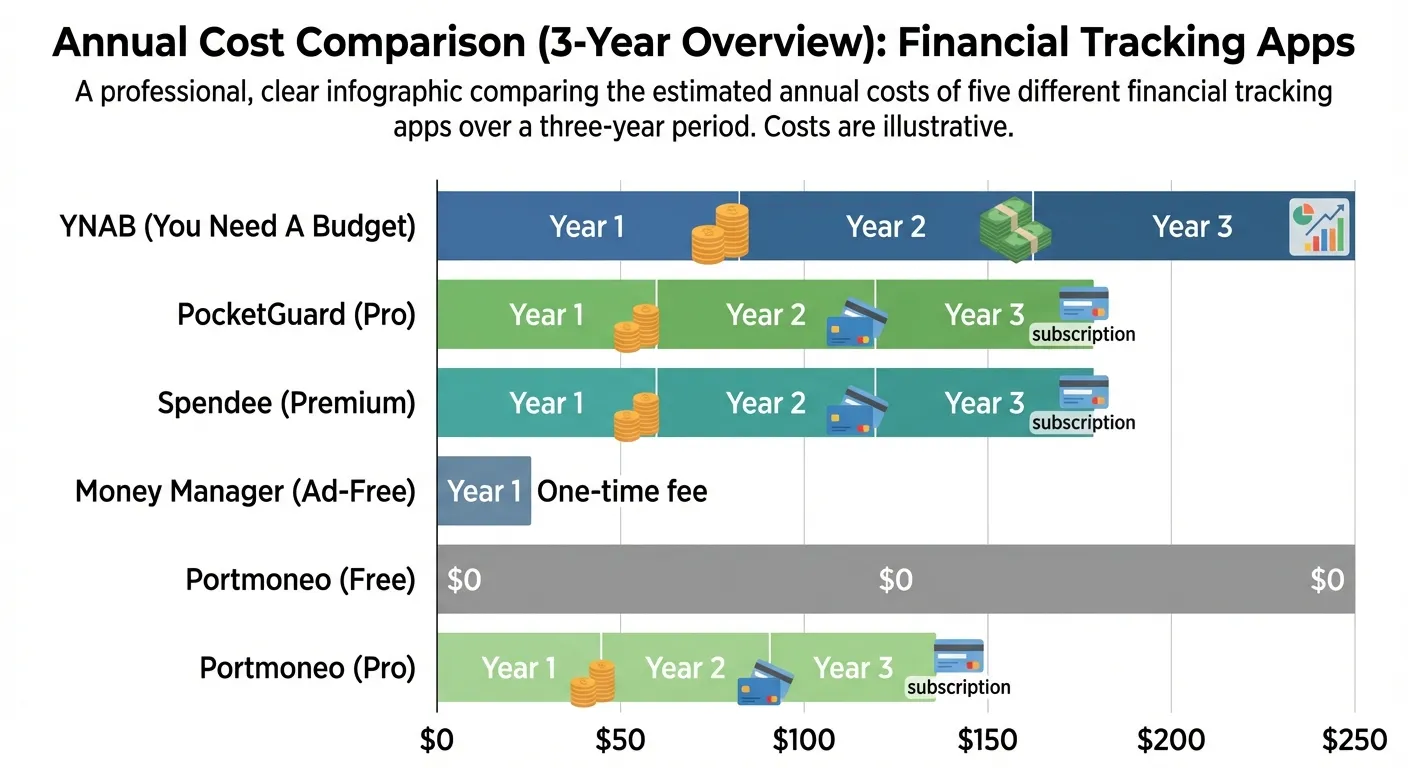
Direct Answer: Range: $0 to $99/yr. Portmoneo/Money Manager: Free/Low cost. Spendee ~$36. PocketGuard ~$75. YNAB ~$99. Know the annual bill before signing up.
Most of the best expense tracker apps operate on subscription models, whose costs can accumulate over time. It’s essential to consider the annual cost for a complete view:
- YNAB: $99/year (equivalent to $8.25/month if paid annually).
- PocketGuard Plus: $74.99/year (equivalent to $6.25/month if paid annually).
- Spendee Premium: $35.88/year (equivalent to $2.99/month).
- Money Manager Premium: $2.99 (one-time purchase, no subscription).
- Portmoneo: Offers a full free tier, and its prices for the Pro tier are designed to be highly affordable, offering excellent value for its advanced features.
How to Evaluate the Real Value of an Expense Tracker App?
Direct Answer: Efficiency. If an app saves you 2 hours of admin a month, it pays for itself. Stress reduction and audit safety are priceless dividends.
When evaluating prices, don’t just look at the monthly cost, but what you truly get for that money. An app that seems cheap at $2.99/month but lacks essential features (like good OCR or offline functionality) can turn out to be worse value than a free expense app to start that offers robust functionality. Consider:
- Time savings: How much time does the app save you on manual entry and organization?
- Accuracy: Does it minimize errors and give you peace of mind?
- Functionality: Does it cover all your key needs, especially if you travel or prioritize privacy?
- Stress reduction: Does it simplify your financial life instead of adding complexity?
A slightly higher cost, or even a well-designed free tier, that meets these criteria can be a much better investment in your personal finance control than a seemingly cheap option that creates more work for you. According to a study by the Bank of Spain, the use of digital tools for personal financial management is on the rise, underscoring the importance of choosing solutions that provide real value.
What Are the Pros and Cons of Each Expense Tracker App?
Direct Answer: Trade-offs. Portmoneo: Privacy vs. Brand Awareness. YNAB: Power vs. Price. PocketGuard: Ease vs. Depth. Spendee: Sharing vs. Scanning. Pick your compromise.
To help you make an informed decision, here we break down the pros and cons of each of the best expense tracker apps 2026.
What Are the Pros and Cons of Portmoneo?
Direct Answer: Pros: Privacy, Offline, Free Tier. Cons: Simpler team features. Best: Freelancers & Travelers.
- Pros:
- Genuinely functional and unlimited free tier.
- Full offline functionality, ideal for any disconnected situation.
- Privacy-first architecture, processing data on-device.
- Excellent OCR accuracy (over 95%).
- Modern AI features (line item extraction, automatic categorization).
- Simple, intuitive, easy-to-use interface.
- Transparent and affordable pricing for advanced features.
- No ecosystem lock-in, allowing flexibility.
- Cons:
- Newer platform, with less brand recognition than veteran competitors.
- Smaller integration ecosystem compared to enterprise solutions.
- Less robust team management features than apps geared towards large companies.
- Best For: Privacy-conscious users, frequent travelers, freelancers, consultants, small teams, and anyone looking for a modern AI expense tracker without the complexity of a costly subscription.
What Are the Pros and Cons of YNAB (You Need A Budget)?
Direct Answer: Pros: Behavior change, education. Cons: Price, Learning Curve. Best: Committed Budgeters.
- Pros:
- Proven and highly effective budgeting methodology.
- Excellent educational resources for learning to manage your finances.
- Robust and well-designed mobile application.
- Helps develop healthy long-term financial habits.
- Detailed goal tracking and financial planning features.
- Cons:
- Steep learning curve due to its specific methodology.
- More expensive compared to other pure expense trackers.
- Limited offline functionality.
- Requires a bank connection to fully leverage its features.
- Can be overkill if your only need is expense tracking.
- Best For: Users committed to a budgeting methodology, individuals who want to learn to better manage their finances, and those seeking deep integration between budgeting and expense tracking.
What Are the Pros and Cons of PocketGuard?
Direct Answer: Pros: Simplicity, “In My Pocket”. Cons: Privacy (Bank Link), Limited Detail. Best: Casual trackers.
- Pros:
- Extremely simple interface and easy to use.
- The “In My Pocket” concept is very intuitive and useful for daily spending.
- Automatic categorization of bank transactions using AI.
- Good for identifying spending patterns and subscriptions.
- Cons:
- Requires a bank connection, which can raise privacy concerns.
- Limited offline functionality.
- Receipt scanning is not a primary feature.
- The free tier is very limited, almost a demo.
- Less detailed in tracking than specialized expense trackers.
- Best For: Users seeking simplified budgeting, individuals who prefer automatic categorization, and those who want a quick financial overview.
What Are the Pros and Cons of Spendee?
Direct Answer: Pros: Collaboration, Visuals. Cons: Limited Scanning, Bank Link focus. Best: Couples/Roommates.
- Pros:
- Excellent for shared expense management (couples, roommates).
- Good graphical visualizations for understanding expenses.
- Multi-currency support, ideal for international travelers.
- Category-based tracking is intuitive.
- Cons:
- Receipt scanning is not a prominent feature.
- Limited offline functionality.
- Requires a bank connection for automatic import.
- The free tier is very restricted.
- Less focused on detailed receipt processing.
- Best For: Couples, roommates, or small groups who share expenses, users who value visual insights into their finances, and individuals who manage expenses in multiple currencies.
What Are the Pros and Cons of Money Manager?
Direct Answer: Pros: Fast, Simple, One-time cost. Cons: Manual ONLY (No OCR), Ads (in free). Best: Manual loggers.
- Pros:
- Extremely simple and no learning curve.
- Fast manual expense entry.
- Lightweight and efficient app, works well on most devices.
- Ideal for basic, no-frills expense tracking.
- Cons:
- Manual entry only, no receipt scanning.
- Limited offline functionality.
- Very basic features compared to competitors.
- No AI or automatic categorization.
- The free version includes ads.
- Best For: Basic expense logging, users who prioritize absolute simplicity, and lightweight personal finance control needs.
Which Expense Tracker App Is Best for My Use Case?
Direct Answer: Matchmaker. Freelancer -> Portmoneo. Budgeter -> YNAB. Couple -> Spendee. Casual -> PocketGuard. Manual -> Money Manager. Don’t force a mismatch.
Choosing the best expense tracker app 2026 isn’t just about features, but how those features align with your lifestyle and specific needs. Here’s how to find the perfect app for your use case.
Which Is the Best Expense App for Freelancers and Consultants?
Direct Answer: Portmoneo. It handles taxes, projects, and irregular income perfectly, for free. It’s the freelancer’s toolkit.
- Recommended: Portmoneo
- Key Requirements Met:
- Free to start: Crucial for freelancers with variable budgets.
- Excellent receipt scanning: Essential for maintaining professional, accurate records for accounting and taxes.
- Offline functionality: Allows logging expenses at remote client sites or during travel without connectivity.
- Export capabilities: Facilitates tax preparation and integration with accounting software.
- Categorization by client/project: Allows assigning expenses directly to specific projects, vital for invoicing and profitability analysis.
Which App Is Best for Privacy-Conscious Users?
Direct Answer: Portmoneo. On-device safety + Optional Cloud. Your financial data isn’t the product.
- Recommended: Portmoneo
- Key Requirements Met:
- On-device processing: Your sensitive data stays on your phone, not sent to third-party servers by default.
- Optional cloud synchronization: You control when and how your data flows, deciding whether to back it up to the cloud.
- No mandatory bank connections: You can perform full expense tracking without directly linking your bank accounts.
- Transparent data policies: Clarity on how your data is handled and protected.
Which Is the Best Expense App for Frequent Travelers?
Direct Answer: Portmoneo. Offline mode that works. Scan on the tarmac, sync at the hotel. No more lost receipts abroad.
- Recommended: Portmoneo
- Key Requirements Met:
- Full offline functionality: Allows logging and processing receipts on planes, trains, or in remote locations without internet.
- Reliable synchronization: Ensures you won’t lose data once you regain connection.
- Time zone handling: Logs expense timestamps accurately, regardless of your location.
- Quick receipt capture: Minimizes time spent on expense tracking during your trips, allowing you to focus on your activities.
Which App Is Best for Users Focused on Detailed Budgeting?
Direct Answer: YNAB. If you want to change your life and habits, pay the price and learn the system. It works.
- Recommended: YNAB
- Key Requirements Met:
- Integrated budgeting and expense tracking: Combines both functions for a holistic view.
- Goal tracking and planning: Helps you achieve your financial goals with a clear plan.
- Educational resources: Provides the tools and knowledge to master budgeting.
- Methodology-driven approach: Guides you to disciplined and effective personal finance control.
Which Is the Best App for Shared Expense Management?
Direct Answer: Spendee. Shared wallets prevent money fights. Visibility creates accountability.
- Recommended: Spendee
- Key Requirements Met:
- Shared expense categories: Allows all group members to view and contribute to the same categories.
- Multi-user support: Several people can access and add expenses to a shared “wallet.”
- Visual expense insights: Helps the group understand their joint spending patterns.
- Collaborative features: Facilitates splitting and reconciling expenses.
Which App Is Best for Simple and Basic Expense Tracking?
Direct Answer: Money Manager. Fast, light, easy. If you just want a list of where money went, this is it.
- Recommended: Money Manager or Portmoneo’s Free Tier
- Key Requirements Met:
- Simple interface: Easy to use and without distractions.
- Basic categorization: Allows organizing expenses into essential categories.
- Fast expense entry: For manual and efficient transaction logging.
- No complexity: Ideal for those who don’t need extra features.
How to Start Using My New Expense Tracker App?
Direct Answer: Start Small. Pick one app. Scan one receipt today. Form the habit before worrying about advanced features.
Once you’ve chosen the best expense tracker app 2026 for your needs, how you implement and use it will make all the difference in your financial success. Follow these steps for an effective start:
How to Choose My App Based on Primary Use Case?
Direct Answer: Review Recommendations above. Pick based on your lifestyle (Travel vs Home, Budget vs Track).
- Review the previous recommendations and select the app that best aligns with your most pressing need:
- Privacy + Travel: Portmoneo
- Budget Integration: YNAB
- Simplified Overview: PocketGuard
- Shared Expenses: Spendee
- Basic Tracking: Money Manager or Portmoneo’s Free Tier
How to Set Up My Initial Account?
Direct Answer: Setup. Profile -> Currency -> Categories. Spend 5 minutes making it “yours” so you enjoy using it.
- Create your account: Use the free tier or free trial if available to evaluate the app without commitment.
- Complete initial setup: This includes setting default categories, defining your currency preferences, and, if necessary, connecting bank accounts (only if you feel comfortable and the app requires it).
- Familiarize yourself with the interface: Spend a few minutes exploring the app, its menus, and how expenses are logged.
- Test core features: Make some test expense entries or scan a receipt to understand the workflow.
How to Set Up and Customize My Expense Categories?
Direct Answer: Relatable Categories. Rename “Food” to “Tacos” if it helps. Group expenses by “Project” or “Client” if you work for yourself.
Effective categorization is the heart of personal finance control.
- Review default categories: Many apps come with standard categories like “Food,” “Transportation,” “Vivienda” (Housing).
- Create custom categories: Adjust categories to match your lifestyle or business (e.g., “Office Supplies,” “Professional Development,” “Pet Care”).
- Set up project/client categories (if applicable): If you’re a freelancer or consultant, this is crucial for tracking billable expenses.
- Organize categories for easy access: Make sure your most used categories are easy to find.
How to Test My App’s Receipt Scanning?
Direct Answer: Stress Test. Scan a crumpled receipt. Scan a dark one. See if the app passes the “Real Life” test.
If your app offers OCR, testing its effectiveness is vital.
- Scan various receipt types: Try printed receipts, electronic receipts (if the app allows), faded receipts, or those with handwritten notes.
- Verify OCR accuracy: Compare the extracted information with the original receipt and edit any errors.
- Test batch scanning capabilities (if applicable): If you have several receipts, evaluate the app’s efficiency in processing them together.
- Evaluate automatic categorization quality: Observe if the app’s AI correctly categorizes scanned expenses.
How to Set Up Integrations If I Need Them?
Direct Answer: Link Up. Connect to your accounting software or test the CSV export. Ensure data can leave the app when you need it.
If you use other financial tools, integrations are key.
- Connect accounting software: If you use QuickBooks, Xero, or similar, set up the integration to automatically export data.
- Test export formats: Ensure you can export your data in CSV, Excel, or PDF in a useful way for your needs (e.g., for taxes).
- Verify integration data flow: Send some test data to confirm it transfers correctly.
- Set up automated workflows: If the app allows, automate transaction import or report generation.
How to Establish a Consistent Daily Workflow for Expense Tracking?
Direct Answer: The 5-Second Rule. Scan receipts as you get them. Correct errors instantly. Don’t let tasks pile up.
Consistency is key to effective expense tracking.
- Scan receipts immediately: Avoid accumulating receipts. The sooner you log them, the less likely you are to forget or lose them.
- Review and correct OCR results promptly: Don’t let errors pile up; correct them as soon as you scan.
- Categorize expenses consistently: Maintain consistency in assigning categories for accurate reports.
- Export regularly: Perform weekly or monthly exports of your data for backup and analysis.
- Review spending patterns periodically: Dedicate time each week or month to analyze your expenses to identify areas for improvement in your personal finance control.
How to Evaluate and Adjust My Expense Tracker App Usage?
Direct Answer: 2-Week Review. Ask: “Is this saving me time?” If yes, upgrade. If no, export data and switch. Don’t settle for friction.
After 2 to 4 weeks of continuous use, perform an honest evaluation:
- Evaluate if the app meets your needs: Is it helping you achieve your financial goals?
- Identify missing features or workflows: Is there anything you wish the app did better or doesn’t do at all?
- Evaluate price vs. value received: Do you feel the subscription (if you have one) is worth what you’re paying?
- Make adjustments or consider alternatives: Don’t be afraid to switch if the app isn’t working for you. Your time and finances are too valuable.
What Are the Frequently Asked Questions About Expense Tracker Apps?
Direct Answer: FAQs. Free options (Portmoneo), Bank Links (Optional), OCR Quality (Critical), Offline (Essential). Check the fine print.
Here we answer the most common questions about choosing and using expense tracker apps and budget management.
Which Is the Best Free Expense Tracking and Budget Management App?
Direct Answer: Portmoneo (Scanning/Offline) or Money Manager (Manual). Both offer real utility for $0.
Do I Need to Connect My Bank Account to These Apps?
Direct Answer: No. Portmoneo works fine without. Others require it. Choose based on your comfort level.
Which App Offers the Best OCR Technology for Receipt Scanning?
Direct Answer: Portmoneo (>95% + Offline). Accuracy coupled with availability everywhere is the gold standard.
Can I Use These Apps Offline?
Direct Answer: Portmoneo = Yes (Full). Others = Limited (Capture only, process later).
Which Is the Best Expense Management App for Freelancers and Consultants?
Direct Answer: Portmoneo. Freelancers need low cost + high detail. Portmoneo delivers both.
Do These Apps Work for Small Teams?
Direct Answer: Small teams? Yes (Portmoneo/Spendee). Big Corp? No, get Expensify.
Can I Export My Data If I Decide to Switch Apps Later?
Direct Answer: Yes. Portmoneo allows CSV export for free. Never use an app that locks your data.
What If I Want to Switch Apps Later?
Direct Answer: Export CSV. Import to new app. Simple if you have the file; impossible if you don’t.
Conclusion: How to Find Your Perfect Expense Tracker for 2026?
Direct Answer: Fit matters. Freelancer/Traveler? Portmoneo. Budgeter? YNAB. Team? Expensify. Pick the tool that solves your specific problem.
The “perfect” expense tracker app isn’t a myth; it’s simply the one that best aligns with your specific workflow, privacy requirements, and budget. There’s no one-size-fits-all solution, but there is an ideal match for your individual or small business needs.
For most users, especially freelancers, consultants, privacy-conscious professionals, and frequent travelers, Portmoneo represents the best balance of features, privacy, offline functionality, and value. Its truly functional free tier allows for risk-free evaluation, and its modern AI features match or exceed much more expensive alternatives.
The key is to experiment with the apps that best fit your use case. Most offer free tiers or trials, making evaluation a risk-free process. Start with the app that best matches your primary needs, use it for 2 to 4 weeks, and make any necessary adjustments based on your real-world experience. Your personal finance control depends on it.
Ready to find your perfect expense tracker? Try Portmoneo for free today and experience modern expense management that works how you work: privately, offline, and without breaking your budget.